You cannot save and return to the form. Have everything ready before you start
You should not refresh the page once you start, as you may lose information
When entering the building permit number or site address, information may not populate immediately. Please click in the text field and allow a few moments for it to appear.
Be prepared before you start
Understand what's required for referring enforcement tools or inspection notifications. This includes the material you need to prepare and the statements you may need to write.
Please have all the required documentation and information ready before you start.
You will need the relevant permit number prior to the submission process. This will ensure the right information populates the record.
Checklist for DTF and BO referrals
Before referring a Direction to Fix or Building Order to the BPC use this checklist to review your documents for accuracy and completeness.
Get started
Use the Building Activity Management System (BAMS) portal to submit your referrals.
The portal cannot be used to report non-compliances that are not related to statutory referrals.
If you detect other non-compliances, you can still report them by emailing complaints@bpc.vic.gov.au.
This could include any contravention that would not form part of a statutory referral, such as:
building beyond the permit
not completing protection works
plans that continually fail to demonstrate compliance.
Reports may be used as intelligence about the practitioner, or for direct action if appropriate. The building surveyor still has the primary enforcement role.
User access
Following legal requirements, only the Relevant Building surveyor (RBS) can submit a referral.
The portal may permit other staff to prepare a referral and to make the lodgement. However, the RBS is accountable for overseeing the lodgement and must make a declaration when it is submitted by them directly or via their agent.
You can use their existing account details
For users who have access to the BPC portal, login as usual
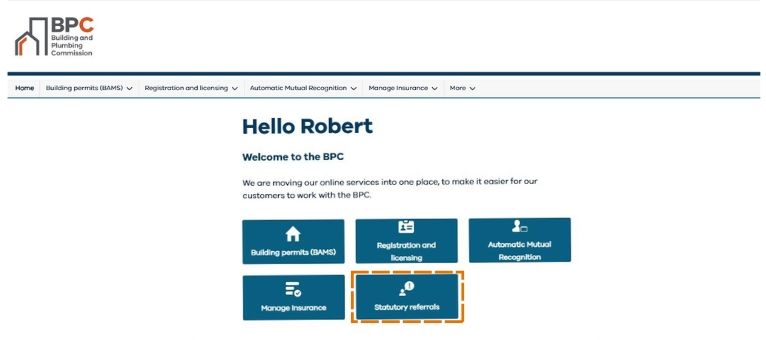
From the main screen, select the Statutory referrals tile.
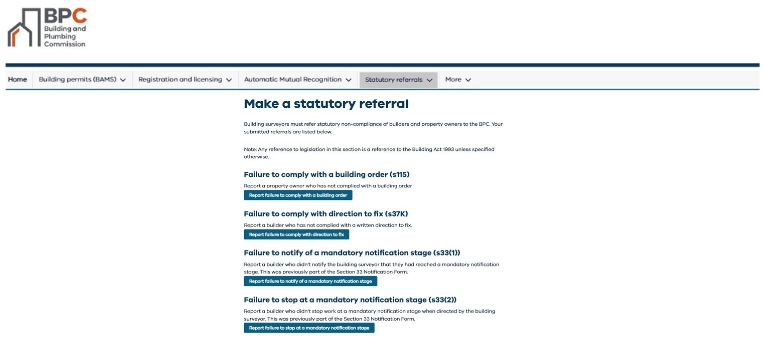
From the Make a statutory referral page, identify the required form to be submitted.
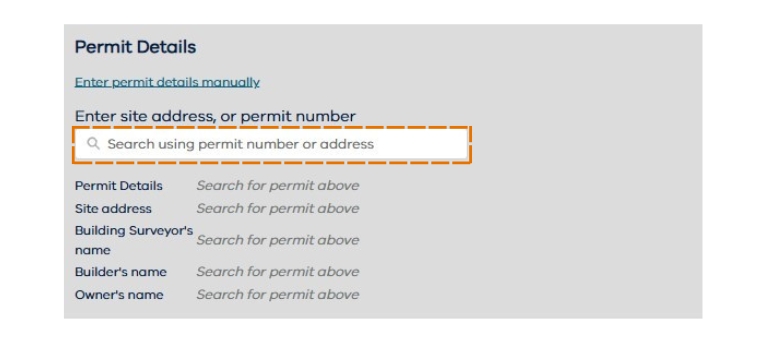
In all cases, the building permit details can be prefilled when you provide the permit number or address:
Permit details
Site address
Builders name
Owners name
Example of portal steps
For users that have access to the BPC portal, login as usual. From the main screen, select the Statutory referrals tile.
From the Make a statutory referral page, identify the required form to be submitted.
The building permit details can be prefilled when you provide the permit number or address.
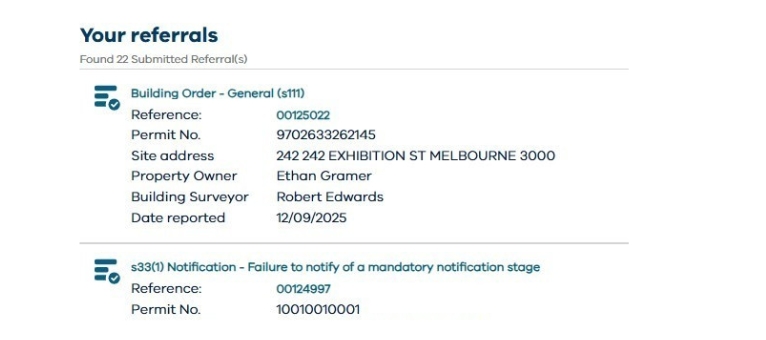
You can see all referrals submitted against your user profile.
You will need to make statements to explain the referral. The required statements depend on the submission type. These statements can be primary evidence to support BPC enforcement action or to make the referral valid. See the advice for referring to enforcement tools or for inspection notifications.
It is important to be prepared prior to commencing the lodgement process to respond to each question. The BPC needs this information to assess and manage the referral.
Supporting documentation - quick reference
For a DTF or Building Order
You will usually need to include these documents with your referral:
A copy of the DTF or building order (and related building notices)
Method and proof of service
A copy of the building permit, including amendments
Any relevant reference documents, including photographs (if applicable)
Evidence of property ownership, such as the title (for Building Orders)
Records relating to builder or owner responses and actions
For a s33 inspection notification
You will usually need to include these documents with your referral:
Records related to appointing the relevant or designated building surveyor
A copy of the building permit, including any amendments
Any relevant reference documents that show the scope and stages of the work
Evidence relating to the failure to notify or stop
Evidence supporting written or oral directions to stop work (for example, inspection records or file notes)
Copies or related enforcement actions or tools (if applicable) and their service
Your submitted referrals
You can see all referrals submitted against your user profile. While users can view all submitted referrals in the portal, referral status tracking is not available.
Find out more about using the BAMS portal, or for questions about the referral process, please get in touch with us at referrals@bpc.vic.gov.au